
Docker Compose 集群部署前端镜像无权限问题
正文与配图来自原稿。本地改源码后用 msa 打镜像、Compose 集群能起服务但打不开前端时的排错。
1、问题描述
本地修改 ThingsBoard 源码后,使用 msa 构建镜像。猜测与 Windows 本地打镜像有关:打出来的前端(web-ui)镜像里目录/文件权限不对。整套服务能启动,但无法正常访问前端页面。
相关构建/部署流程可对照:msa 构建镜像并部署、msa 构建镜像(配置与排错)。
2、解决办法
在 msa 下前端 web-ui 模块的 Docker 相关目录中,修改 Dockerfile:在安装依赖前增加一行,给安装目录放开权限:
dockerfile
&& chmod -R 775 ${pkg.installFolder} \完整 Dockerfile 示例如下(与原稿一致,版本基础镜像以你分支为准):
dockerfile
#
# Copyright © 2016-2023 The Thingsboard Authors
#
# Licensed under the Apache License, Version 2.0 (the "License");
# you may not use this file except in compliance with the License.
# You may obtain a copy of the License at
#
#     http://www.apache.org/licenses/LICENSE-2.0
#
# Unless required by applicable law or agreed to in writing, software
# distributed under the License is distributed on an "AS IS" BASIS,
# WITHOUT WARRANTIES OR CONDITIONS OF ANY KIND, either express or implied.
# See the License for the specific language governing permissions and
# limitations under the License.
#
FROM thingsboard/node:16.17.0-bullseye-slim
ENV NODE_ENV production
ENV DOCKER_MODE true
COPY start-web-ui.sh /tmp/
WORKDIR ${pkg.installFolder}
COPY ["src/package.json", "src/yarn.lock", "./"]
COPY package/linux/conf ./conf
COPY package/linux/conf ./config
COPY web ./web
COPY src/config ./config
COPY src/server.js ./
RUN chmod a+x /tmp/*.sh \
 && mv /tmp/start-web-ui.sh /usr/bin \
 && chown -R node:node ${pkg.installFolder} \
 && chmod -R 775 ${pkg.installFolder} \
 && yarn install --production && yarn cache clean --all
USER node
CMD ["start-web-ui.sh"]
关键是在已有 chown -R node:node ${pkg.installFolder} 之后,再执行:
dockerfile
&& chmod -R 775 ${pkg.installFolder} \示意:
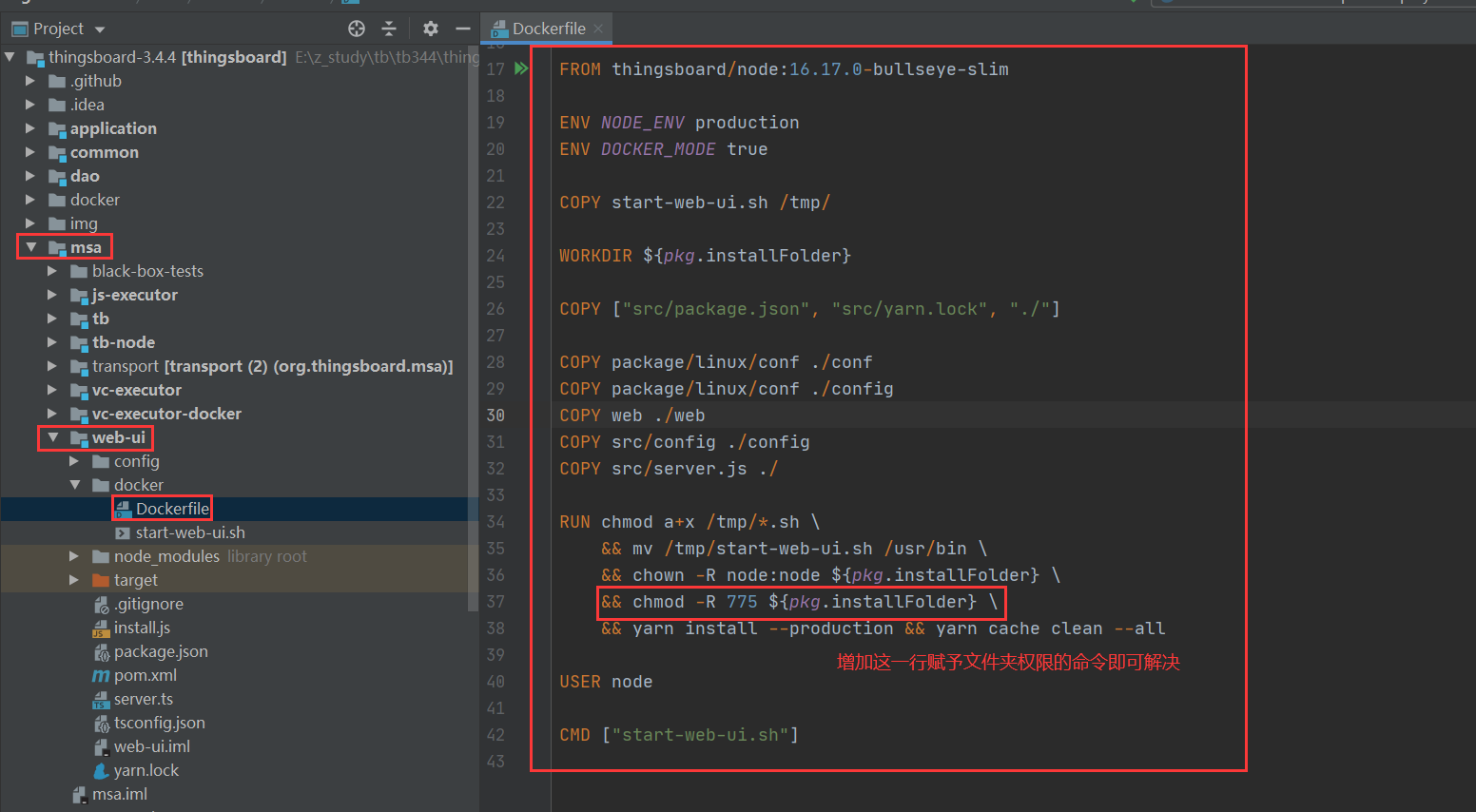
改完后重新用 msa 构建 web-ui 镜像,再按 Compose 拉起服务,用浏览器验证前端是否可打开。
补充(辅)
- 容器最终以
USER node运行;Windows 构建时复制进镜像的文件权限/属主有时与 Linux 预期不一致,chown+chmod可避免 node 用户读不到静态资源或配置。 - 若只重建 web-ui:可对对应 msa 子模块单独
mvn … -Ddockerfile.skip=false,不必全量重打所有镜像。 - 4.3.x 的 Node 基础镜像 tag 可能不同,改权限这一行的思路相同,以你仓库里实际 Dockerfile 为准。